
.avif)

Blog Summary / Key Takeaways
- What accounts payable services actually include task by task
- How the AP process works from invoice receipt to payment
- Where AP errors consistently show up in client books
- How CPA firms are structuring AP management at scale
- What dedicated offshore AP staff costs vs. local hiring
Introduction
Every business has vendors. Every vendor sends invoices. And every invoice needs to be received, reviewed, approved, entered, scheduled for payment, and reconciled against the bank statement.
That is the AP cycle. Repeated across every client, every vendor, every week of the year.
For CPA firms managing AP on behalf of clients, the volume adds up fast. A mid-size bookkeeping practice with 30 clients might be processing 400–600 vendor invoices per month. Each one needs to go through the same steps. Each one that gets missed, duplicated, or misposted creates work somewhere downstream.
This guide covers what accounts payable services actually include, how the process runs from end to end, and how CPA firms are structuring AP management efficiently with and without offshore support.
What Are Accounts Payable Services?
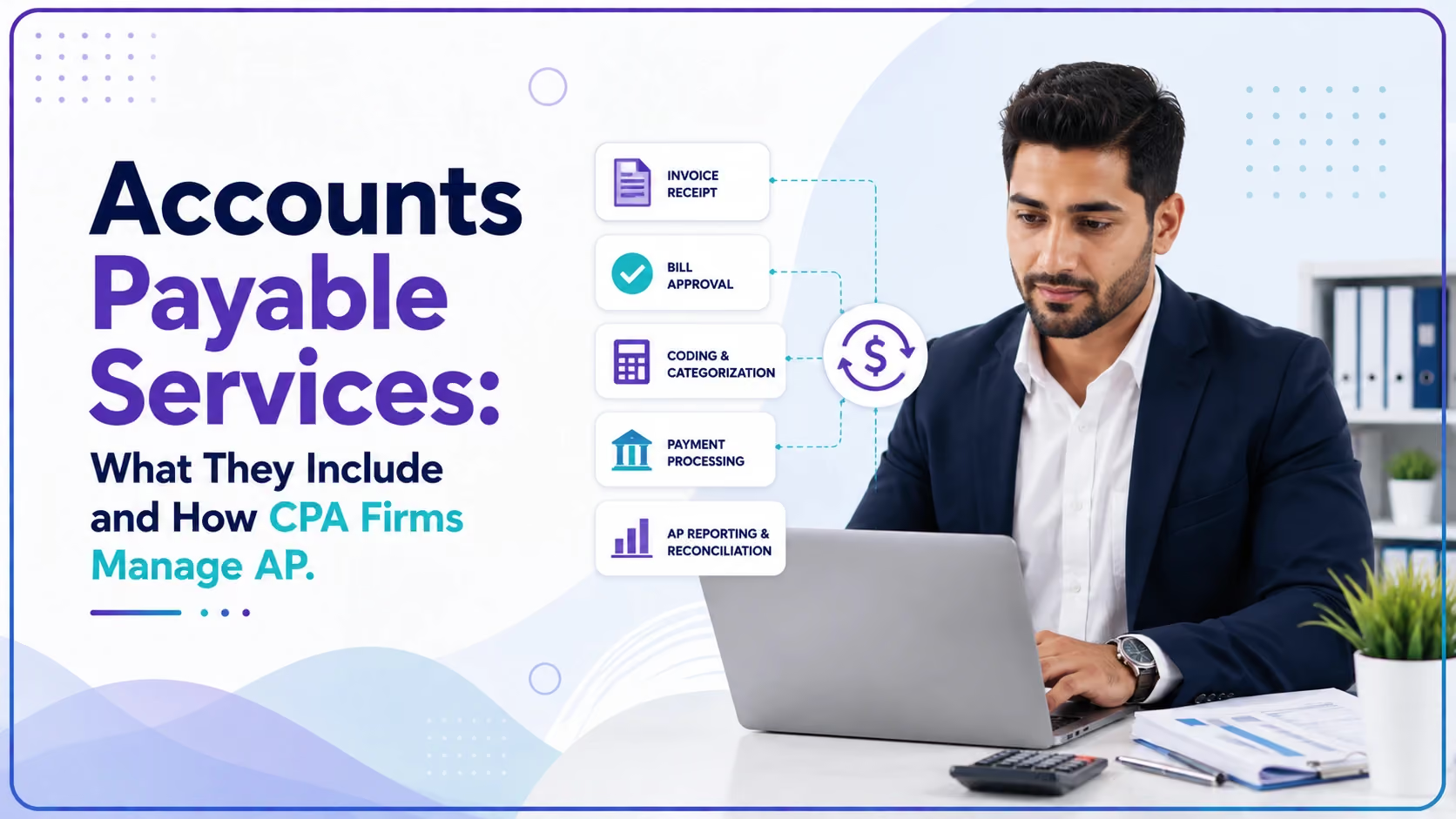
Accounts payable services are the set of tasks involved in managing a business's obligations to its vendors and suppliers. This includes receiving and recording invoices, verifying accuracy, scheduling and processing payments, maintaining vendor records, and reconciling AP balances.
When a CPA firm provides AP services to a client, they are taking on the full cycle from the moment a vendor invoice arrives to the moment the payment clears the bank and is reconciled.
Core accounts payable services include:
Why Does AP Management Matter for CPA Firms?
Accounts payable sits at the intersection of cash flow, vendor relationships, and financial accuracy. When AP is managed well, the client's cash flow is optimized, vendors are paid on time, and the books reflect the true liability position at every close.
When AP breaks down, the consequences are immediate and visible:
- Vendors stop supplying or downgrade payment terms
- Duplicate payments drain cash without anyone noticing until the reconciliation
- Unpaid invoices accumulate in the AP aging and distort the liability picture on the balance sheet
- Late fees add cost that was never budgeted
- The month-end close takes longer because AP reconciliation is incomplete
For CPA firms, poor AP management on a client's books creates rework at close senior accountants spend time untangling vendor balances instead of doing the review work they're supposed to be doing.
According to data from 100+ CPA firms working with Etisson, AP management is one of the top three areas where firms report their bookkeeping staff spends disproportionate time relative to the complexity of the work. It is high-volume, rule-based, and well-suited to a dedicated, structured workflow.
Who Should Handle Accounts Payable in a CPA Firm?
AP management sits primarily at the bookkeeper level it is transactional, rules-based work that does not require a CPA license. However, a senior accountant or reviewer should be involved at two specific points: invoice approval (for clients where the CPA firm has approval authority) and the monthly AP reconciliation sign-off.
Separation of duties matters here. The person entering invoices should not be the same person approving or processing payments. In a well-structured AP workflow:
For CPA firms providing full-service AP to clients, the Etisson bookkeeper handles the transactional layer entry, coding, scheduling while the firm's senior accountant reviews the aging and signs off on the reconciliation at close.
When Does AP Work Happen in the Bookkeeping Cycle?
AP is not a once-a-month activity. It is a continuous workflow that runs throughout the month and the daily cadence is what keeps the close manageable.
Daily:
- New invoices received and logged
- Invoices coded to correct GL accounts
- Pending invoices routed for client approval
Weekly:
- Payment run executed for approved invoices due in the next 7–10 days
- AP aging report reviewed for past-due items
- Vendor inquiries responded to
Monthly:
- Full AP aging report reviewed before close
- Accrued AP for received-not-invoiced items recorded
- AP balance reconciled to the GL
- AP subledger tied out to the balance sheet
Annually:
- Vendor records cleaned up inactive vendors, updated payment terms
- 1099 vendor payments reviewed and reported
- AP policy reviewed for any changes in vendor terms
What Does the AP Process Look Like End to End?
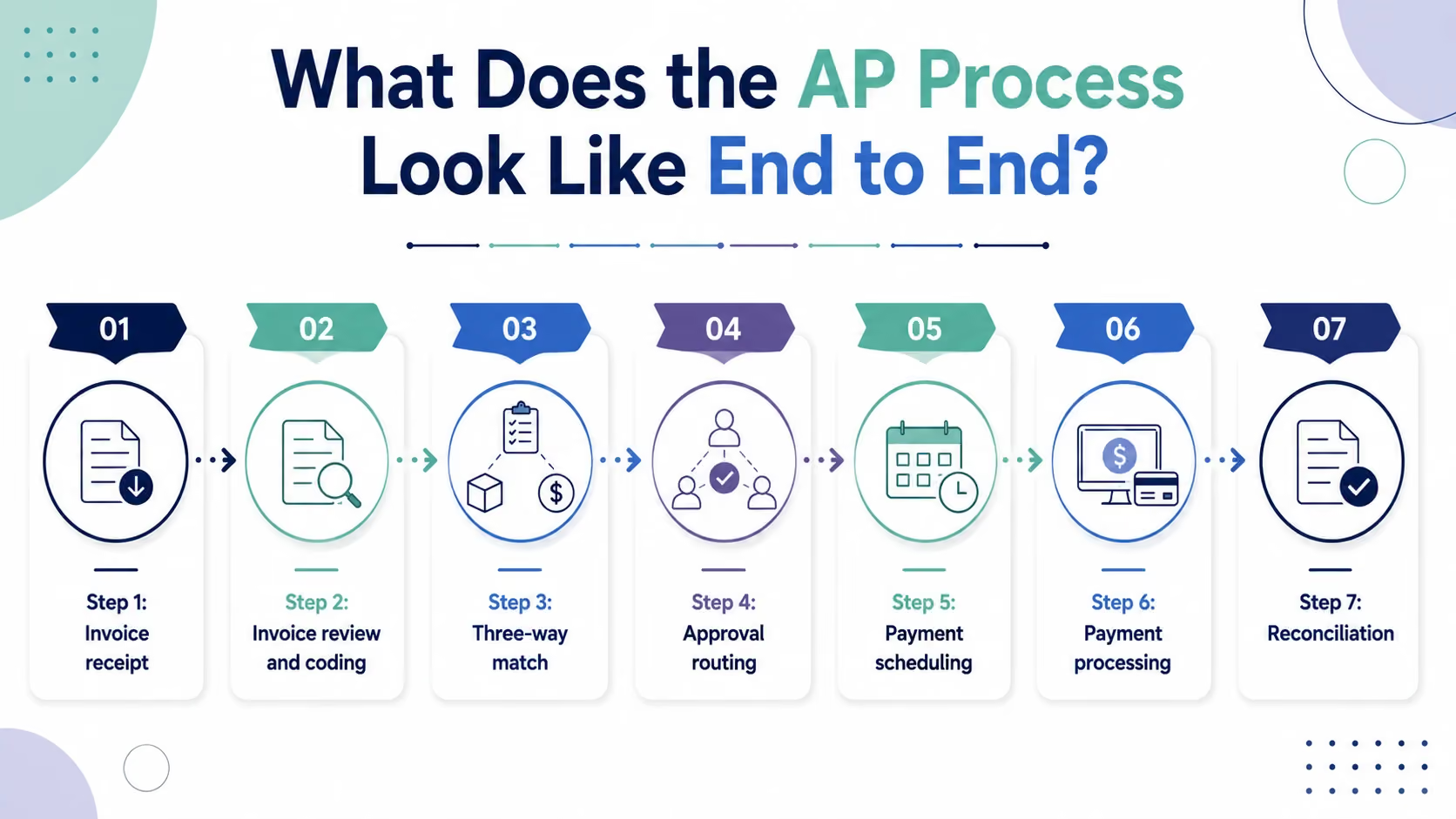
A well-run AP process follows seven steps consistently, for every invoice, every cycle.
Step 1: Invoice receipt Invoices arrive via email, vendor portals, or physical mail. A central inbox or capture tool (like Dext or Bill.com) collects all invoices in one place, preventing any from being missed.
Step 2: Invoice review and coding The bookkeeper reviews each invoice for accuracy correct vendor, correct amount, correct date and codes it to the appropriate GL account, cost center, and class in the accounting system.
Step 3: Three-way match (where applicable) For clients with purchase orders, the invoice is matched against the PO and receiving document before it is approved. Any discrepancy triggers a hold for investigation.
Step 4: Approval routing Invoices above the client's auto-approval threshold are routed for approval before payment is scheduled. This step protects the client from unauthorized or fraudulent payments.
Step 5: Payment scheduling Approved invoices are scheduled for payment based on due date and payment terms. The goal is to pay on time not early (which ties up cash unnecessarily) and not late (which damages vendor relationships and incurs fees).
Step 6: Payment processing Payments are processed via ACH, check, or card through the accounting system or a dedicated AP platform like Bill.com. Remittance advice is sent to the vendor where required.
Step 7: Reconciliation Payments are confirmed against bank statements. The AP subledger the list of outstanding invoices is reconciled to the accounts payable balance on the balance sheet. Any discrepancy is investigated before close.
AP Software Tools CPA Firms Use
The AP tech stack in a US CPA firm typically combines the accounting platform with a dedicated AP tool for higher-volume clients:
Etisson's bookkeepers are trained and proficient across all of these platforms. When a firm brings on an Etisson bookkeeper, there is no learning curve on the software they arrive ready to operate in whatever stack the client uses.
Common AP Errors That Show Up in Client Books
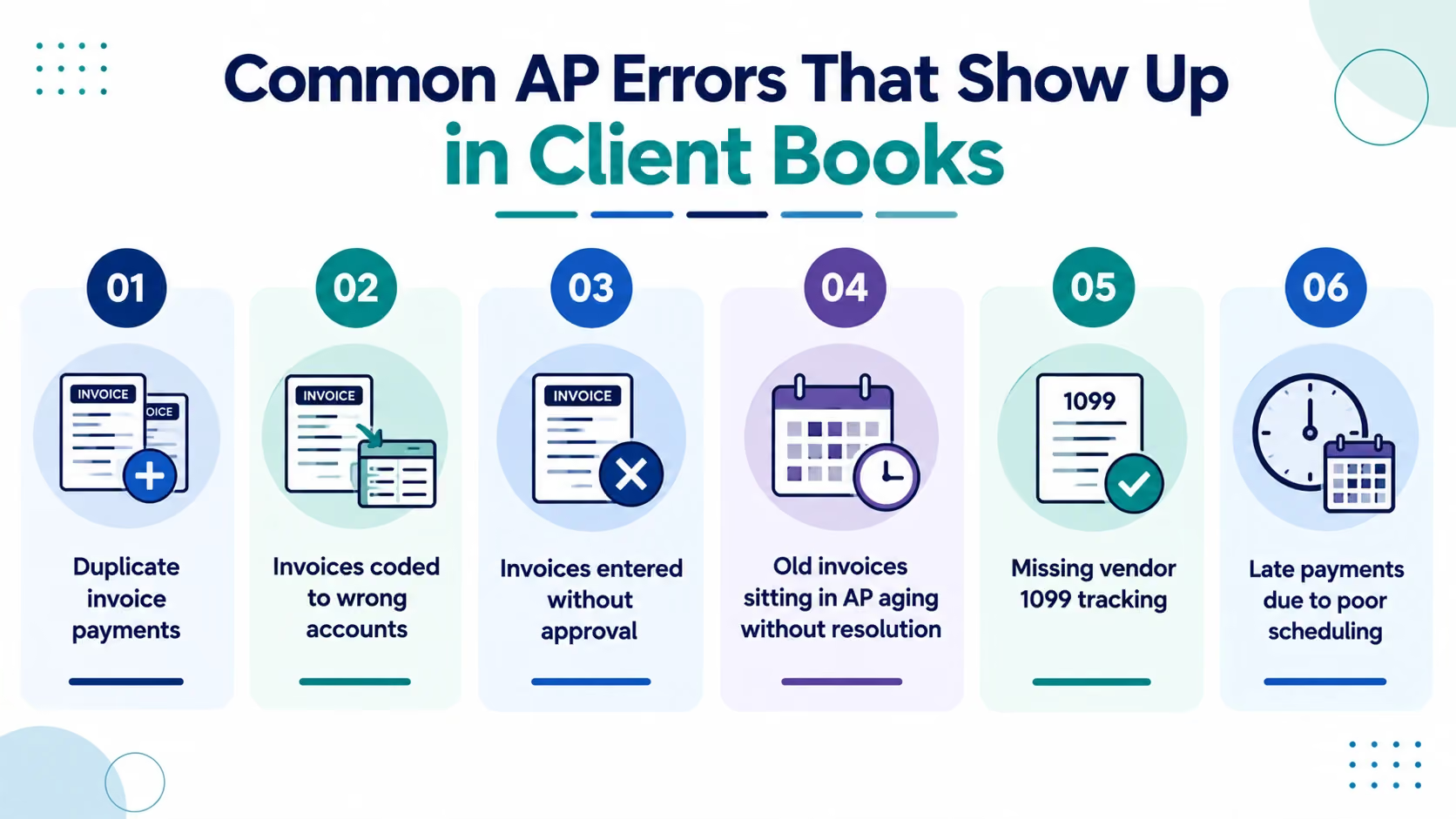
1. Duplicate invoice payments The same invoice entered twice once when the invoice arrived and once when the payment was processed. Results in double the payment being scheduled. Common when invoices come through multiple channels (email to the bookkeeper and direct mail to the client, for example).
2. Invoices coded to wrong accounts A utility bill coded to office supplies. A subcontractor invoice coded to materials. Misclassification distorts the P&L and creates rework when the senior accountant reviews the close.
3. Invoices entered without approval Payments processed before the client has reviewed and approved. Creates liability for the CPA firm if a payment is disputed.
4. Old invoices sitting in AP aging without resolution Vendor invoices from 90 or 120 days ago that are still showing as outstanding. Either the payment was never processed, or it was processed but never matched to the invoice in the system. Creates an overstated AP balance on the balance sheet.
5. Missing vendor 1099 tracking Payments to contractors and vendors who require a 1099 at year-end not being flagged throughout the year. Discovered in December when it is too late to collect W-9s without a fight.
6. Late payments due to poor scheduling Invoices approved but not scheduled for payment until after the due date. Results in late fees that the client has to absorb and that damage the vendor relationship.
AP Aging Reports: What They Tell You and Why They Matter
The AP aging report lists all outstanding vendor invoices grouped by how long they have been outstanding typically current, 30 days, 60 days, and 90+ days.
It is one of the most useful management reports in the AP workflow because it shows:
- Which vendors have unpaid invoices and for how long
- Whether payments are being scheduled and processed on time
- Where disputes or holds are creating aging items
- What the firm's total outstanding AP liability is at any point in time
A healthy AP aging report has almost everything in the current column. Items aging past 30 days need an explanation. Items past 60 days are a problem. Items past 90 days are usually either a dispute, a lost invoice, or a process failure.
Sample AP aging report structure:
In this example, the 61–90 day and 90+ day items need immediate investigation before close.
Real Scenario: How Poor AP Management Cost a Client $22,000
A professional services firm in Texas with 40 employees was using a part-time bookkeeper who worked 20 hours per week. AP was one of her responsibilities among about eight other things.
Because AP was never the priority, the invoice workflow was inconsistent. Some invoices were entered the day they arrived. Others sat in an email inbox for two to three weeks. Approval happened informally the owner would verbally approve something and the bookkeeper would process it without documentation.
Over a 9-month period, two problems compounded:
Problem 1: $14,000 in duplicate payments invoices entered when they arrived and again when the owner forwarded them for payment, not realizing they were already in the system. The bookkeeper did not flag the duplicates. The vendors did not return the overpayments proactively.
Problem 2: $8,000 in late fees across 11 vendors invoices that were entered but never scheduled for payment because the bookkeeper ran out of time before the payment due dates.
Total cost: $22,000 $14,000 in overpayments that took three months to recover and $8,000 in fees that were simply a loss.
The firm moved to a dedicated AP workflow the following quarter centralizing invoice receipt through Bill.com, formalizing an approval process, and bringing in an Etisson bookkeeper dedicated to the AP and bookkeeping workflow. In the eight months since, there have been zero duplicate payments and zero late fees.
How Etisson Handles Accounts Payable for CPA Firm Clients
Etisson's dedicated bookkeepers manage the full AP cycle for CPA firm clients from invoice receipt through payment processing and reconciliation.
What Etisson handles in the AP workflow:
- Daily invoice capture and logging from email, Dext, Bill.com, or direct upload
- Invoice coding to the correct GL account, cost center, and class
- Approval routing to the client or firm contact based on approval thresholds
- Payment scheduling based on invoice due dates and payment terms
- Payment processing via the accounting system or Bill.com
- AP aging report produced weekly or monthly as required
- AP subledger reconciliation to the balance sheet at each close
- 1099 vendor tracking throughout the year
How the staffing model works:
Your dedicated Etisson bookkeeper handles the day-to-day AP workflow. The firm's senior accountant reviews the monthly AP aging and signs off on the reconciliation. You retain approval authority over payments Etisson handles the workflow, not the authorization.
The cost comparison:
See the Etisson ROI Calculator to run your firm's specific numbers. Review case studies from CPA firms that have restructured their AP workflow with Etisson.
Book a free strategy call we'll map out which AP tasks make sense to delegate and give you a custom quote for your firm's situation.
FAQs
What are accounts payable services?
Accounts payable services cover the full cycle of managing a business's vendor invoices and payments receiving and logging invoices, coding to the correct GL accounts, routing for approval, scheduling and processing payments, maintaining vendor records, and reconciling the AP balance to the balance sheet. CPA firms provide these services to clients as part of bookkeeping or controller engagements.
What is included in an accounts payable process?
A complete AP process includes: invoice receipt and logging, GL coding and classification, three-way matching (where POs are used), approval routing, payment scheduling, payment processing (ACH, check, or card), AP aging reporting, AP subledger reconciliation, and year-end 1099 preparation support.
What is an AP aging report?
An AP aging report lists all outstanding vendor invoices grouped by how long they have been outstanding current (0–30 days), 31–60 days, 61–90 days, and 90+ days. It shows which vendors have unpaid invoices, how overdue they are, and what the firm's total outstanding AP liability is. A well-managed AP process keeps almost all items in the current column.
What software is used for accounts payable management?
Common AP tools used in CPA firms include QuickBooks Online and Xero (built-in AP for standard clients), Bill.com (dedicated AP automation with approval workflows and ACH/check processing), Dext (invoice capture), Sage Intacct (mid-market AP with multi-entity support), and NetSuite (enterprise AP). Etisson bookkeepers are trained on all major platforms used in US accounting firms.
What are the most common accounts payable errors?
The most common AP errors are: duplicate invoice payments (same invoice entered twice), invoices coded to wrong GL accounts, payments processed without documented approval, old invoices aging past 60–90 days without resolution, missing 1099 vendor tracking, and late payments due to poor scheduling. Each creates downstream problems at month-end close or year-end.
What is the difference between accounts payable and accounts receivable?
Accounts payable represents money the business owes to its vendors outgoing obligations. Accounts receivable represents money owed to the business by its customers incoming expectations. Both are managed through the bookkeeping workflow, but they sit on opposite sides of the balance sheet. AP is a liability. AR is an asset.
How do CPA firms manage accounts payable for multiple clients?
CPA firms managing AP for multiple clients need a standardized workflow that runs consistently across all client engagements centralized invoice capture, documented coding rules, scheduled payment runs, and a weekly aging review. Firms using dedicated offshore bookkeepers through providers like Etisson assign one bookkeeper to a defined set of clients, giving each client consistent, focused AP attention rather than sharing a generalist across too many engagements.
Conclusion
Accounts payable is high-volume, rules-based work. The process is not complicated but it requires consistency, attention to detail, and a clear workflow that runs the same way every week, for every client, every cycle.
When AP management breaks down, it is almost never because of a knowledge failure. It is because the bookkeeper is doing too many things, invoices are arriving through too many channels, and approval processes are informal. The errors compound quietly until something expensive surfaces.
The fix is a structured AP workflow centralized invoice capture, documented approval rules, scheduled payment runs, and a weekly aging review. That workflow runs well when someone owns it exclusively.
For CPA firms managing AP across multiple clients, a dedicated offshore bookkeeper who handles AP as their primary responsibility not one task among many is the structural change that makes the biggest difference.
Clean AP means clean books. Clean books mean a faster close. A faster close means more capacity for the work that actually grows your firm.
.avif)

.avif)