
.avif)

Blog Summary
- Bank reconciliation automation matches bank activity to ledger entries with rules, so people review exceptions
- The five steps of automated reconciliation, and the matching rules that work
- Who owns rules, exceptions, and sign-off in a CPA firm
- Where automation breaks, with a control for each failure point
- A four-phase rollout plan and a simple sign-off standard
Bank reconciliation is one of the most repeated tasks in any CPA firm. It's also one of the easiest to automate badly.
Many firms switch on bank feeds and matching rules, then discover the real work has shifted to cleaning up wrong matches.
This guide shows how bank reconciliation automation works, where it breaks, and how you can roll it out without lowering review quality.
What is bank reconciliation automation?
Bank reconciliation automation uses rules and software to match bank activity to ledger transactions, so people review exceptions instead of matching every line.
The accountant still owns the result. Automation handles the repeatable matches, while people handle timing differences, unusual items, and sign-off.
Reconciliation is one stage of a wider process. For the stage-by-stage view, read our guide to accounting workflow automation.
What automation does and does not do
- It does: import transactions, apply matching rules, suggest likely matches, and keep a record of every match.
- It does not: decide unusual items, approve its own rules, or sign off the reconciliation.
- It does not: fix a messy chart of accounts or old uncleared items.
How does automated bank reconciliation work?
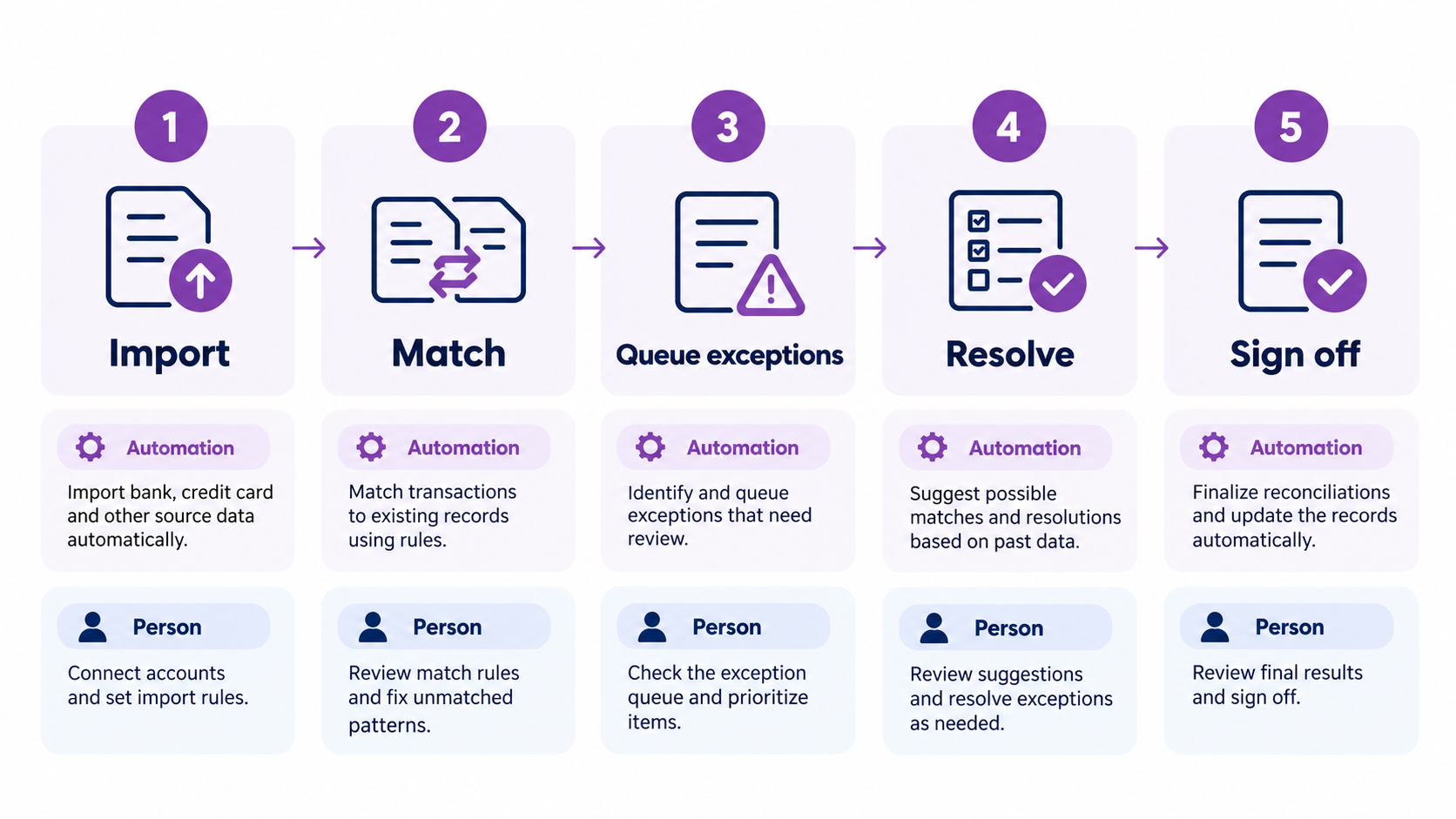
Automated reconciliation follows five steps: import bank data, apply matching rules, queue exceptions, review and resolve, then sign off against the statement.
The exception queue is the heart of the system. Every unmatched item needs an owner, a reason code, and an age, or it quietly goes stale.
Matching rules that work
Start with rules that rarely produce wrong matches. Then add complexity only after the simple rules prove themselves.
For example, a rule that matches a monthly software charge by payee and amount can run unattended. A rule that guesses at partial amounts should always go to review.
- Exact amount and date matches.
- Recurring vendors and payees with stable descriptions.
- Transfers between your own accounts.
- Bank fees and interest with fixed coding.
- Batched deposits, such as merchant payouts, matched to a deposit schedule.
Why do CPA firms automate bank reconciliations?
Firms automate to cut repeat matching work, keep evidence consistent across staff, and point review time at risk instead of volume.
The gain isn't just speed. It's predictable quality: two preparers should produce the same reconciliation from the same data.
Automation also helps the close. When reconciliations finish earlier, the rest of the month end close process starts on time.
Three ways to run reconciliations
However, move to exception review only after the rules prove accurate for several cycles.
Benefits you can measure
Four benefits show up in your numbers, and each one has a simple check.
Measure each one before you automate, so you can show the change later.
Who should own automated bank reconciliation?
A preparer owns the rules and exceptions, a reviewer owns approval, and the controller owns the standard. Shared ownership is the most common reason items go stale.
In an outsourced model, the provider prepares and your reviewer approves. That means the approval right stays inside your firm.
When should a firm automate bank reconciliation?
Automate when volume is high, the same unmatched items repeat, and reviewers keep fixing the same issues. Don't automate before accounts and cutoffs are stable.
Signs you are ready
- The same unmatched item types appear every month.
- Reconciliations finish after day three of the close.
- Review notes keep asking for missing support.
- Staff turnover changes the quality of the work.
- One client has many accounts and feeds.
Signs you are not ready
- Clearing accounts hold old balances.
- Feeds are not connected for every account.
- Cutoff dates change from month to month.
Fix these first. Automation on top of unstable inputs creates more exceptions, not fewer.
A short cleanup project before go-live costs far less than months of reviewing wrong matches.
Where does bank reconciliation automation break?
It breaks at feed gaps, over-broad rules, timing differences, and exceptions nobody owns. Each failure point has a simple control.
Most of these failures are quiet. You'll see them as reviewer rework, not as system errors.
For example, picture a client whose merchant processor batches several days of sales into one payout.
A simple amount match fails every time. A batch rule tied to the deposit schedule fixes it.
How do you implement bank reconciliation automation?
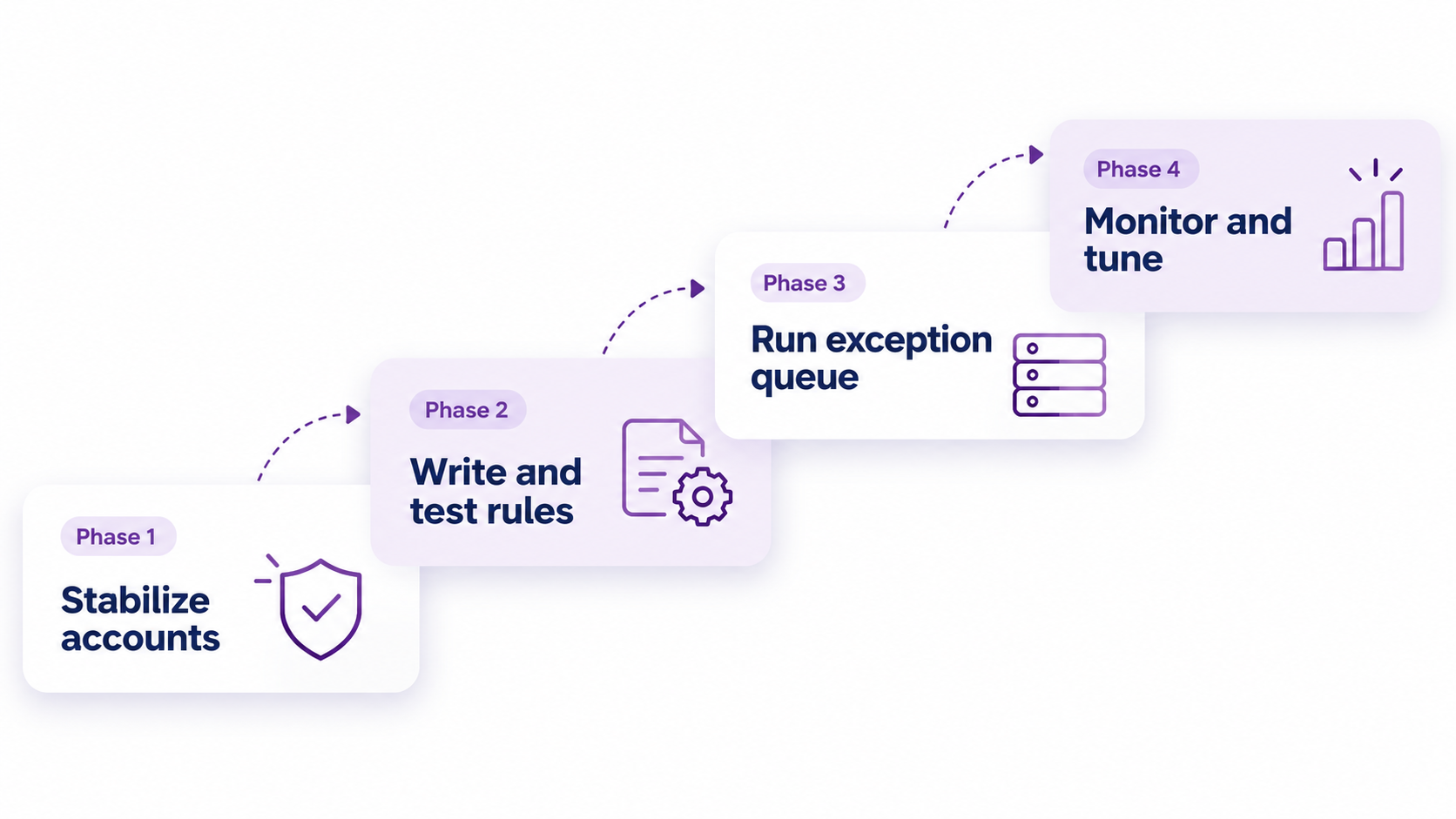
Implement in four phases: stabilize the accounts, write and test rules, run the exception queue, then monitor and tune every month.
Phase 1: Stabilize the accounts
Connect feeds for every account and clear old reconciling items. Then write a one-page SOP that explains how your team prepares and approves a reconciliation.
Phase 2: Write and test rules
Start with exact matches and test each rule against the last three months. The controller should approve a rule before it goes live.
Phase 3: Run the exception queue
Assign a reason code to every exception and set an aging threshold. Sample-review matched items, too, so wrong rules surface early.
Phase 4: Monitor and tune
Track the unmatched rate, aged items, and reviewer rework. Retire any rule that causes errors, and add new rules only for patterns that repeat.
A simple sign-off standard
- Tie the reconciliation to the statement ending balance.
- Leave no unexplained difference.
- Write an explanation for items older than 30 days.
- Attach support to every manual match.
- Record the reviewer name and date.
How should you review automated reconciliations?
Review exceptions first, then a sample of matched items, then the ending balance. This order finds the riskiest issues before the easy ones.
A review order that works
- Open the exception list and check every item has an owner and a reason code.
- Review every item above your value threshold, matched or not.
- Sample the rest by rule, so each rule gets checked at least once.
- Confirm the reconciliation ties to the statement ending balance.
- Record the reviewer name and date.
Reason codes for exceptions
A short, fixed list of reason codes keeps exceptions searchable and prevents vague notes.
What metrics show that reconciliation automation is working?
Track the unmatched rate, aged items, and reviewer rework. Falling exceptions and shorter review notes show the rules are working.
- Unmatched rate by account.
- Count of items older than 30 days.
- Reviewer rework per reconciliation.
- Days from month end to signed reconciliation.
- Percent of reconciliations signed off on time.
Review these every month. If the unmatched rate rises after a rule change, undo the change and investigate before you add more rules.
How does bank reconciliation fit into the month-end close?
Reconciliations are the first heavy task of the close. Start matching during the month, then finish after cutoff.
This sequence matches the 5-day schedule in our month end close guide.
Mistakes to avoid
- Turning on every rule at once.
- Letting preparers change rules without approval.
- Reconciling only at month end.
- Clearing exceptions with vague notes.
- Skipping the sample review because the match rate looks high.
Which reconciliation capabilities matter for CPA firms?
Look for capabilities, not brand names. A tool should support your standard, not force a new one.
Most US firms already have bank feeds in QuickBooks Online or Xero, so test what those rules can do first.
- Rule testing against past periods before a rule goes live.
- A visible audit trail of matches, edits, and approvals.
- Reason codes and aging on every exception.
- Role-based approval, so preparers cannot approve their own work.
- Clean exports for workpapers and reviewer packs.
- Support for many accounts and clients in one view.
For tool selection across the whole firm, see our guide to accounting software for CPA firms.
Where does AI fit in bank reconciliation automation?
AI helps with the messy cases. It suggests matches for unclear descriptions and flags unusual transactions, while a person still approves what posts.
Treat every AI suggestion as an exception to review, not as an approved match.
- Fuzzy matching: it pairs a cryptic description like "AMZN MKTP" with the right vendor.
- Anomaly flags: it highlights duplicates and odd amounts.
- Draft reason codes: it proposes a code for the preparer to confirm.
Keep the audit trail the same as for rule-based matches. Log what the tool suggested and who approved it.
Can you outsource bank reconciliation and keep control?
Yes, if approval stays inside your firm. The provider prepares and documents. Your reviewer samples, approves, and owns the standard.
Define the handoff in writing: cutoff dates, reason codes, aging limits, and what the provider must attach before sign-off.
Real example: Accruity, a US real estate financial firm
Accruity is a US real estate financial firm that runs QuickBooks Online alongside Appfolio and Qualia. It works with Etisson.
In its case study, Accruity reports a 60% cut in labor costs, 25% of partner time reclaimed, and 100% audit-ready books.
A setup that spans three tools makes a consistent reconciliation standard matter even more. Etisson works to documented SOPs and review gates for every client.
Read the full Accruity case study.
How Etisson can help
Most firms don't lack reconciliation tools. They lack the capacity, and a consistent standard, to run them month after month.
Etisson runs on EOS, the Etisson Operating System. Our dedicated bookkeepers work from documented SOPs, and a QC review checks their work before it reaches your reviewer.
A Customer Success contact owns service levels, and weekly partner calls keep exceptions moving. A full-time bookkeeper seat starts at $2,200 per month.
See our account reconciliation services and how we support close and finalization for CPA firms.

Need Reconciliations Done Right Without Adding Headcount?
Etisson's dedicated bookkeepers work from documented SOPs, with QC review before work reaches your reviewer.
FAQ
What is bank reconciliation automation?
Bank reconciliation automation uses rules and software to match bank activity to ledger entries. Accountants review exceptions and sign off instead of matching every transaction by hand.
Can bank reconciliation be automated?
Yes, most of it. Rules match routine transactions and flag exceptions, while a person resolves unusual items and signs off. Skipping that review isn't safe.
How to automate the reconciliation process?
Connect bank feeds, write simple matching rules, send unmatched items to an exception queue, and have a reviewer sign off. Test each rule on past months first.
Can AI do bank reconciliations?
Yes, as a helper. AI can match unclear descriptions and flag odd transactions, but a person should approve what posts and keep the audit trail.
Can you use AI to reconcile QuickBooks?
Yes, with review. AI features and add-ons can suggest matches for QuickBooks bank feed items and flag duplicates. Approve each suggestion before it posts.
What is the easiest way to reconcile a bank statement?
Reconcile every month against bank feeds, match routine items with rules, and clear unmatched items in one pass. Tie the ending balance to the statement before sign-off.
How does automated bank reconciliation work?
It imports bank data, applies matching rules, queues unmatched items, and lets a person resolve exceptions. A reviewer then signs off the reconciliation against the statement.
How often should bank reconciliations be done?
Reconcile at least monthly, and more often for high-volume accounts. Frequent reconciliation keeps unmatched items small and shortens the month-end close.
What should a reviewer check on an automated reconciliation?
Check that the ending balance ties to the statement, aged items have explanations, rule changes were approved, and support is attached to every manual match.
Does automation replace the accountant?
No. Automation replaces repetitive matching. Accountants still handle exceptions, judgment calls, rule approval, and sign-off.
Conclusion
Bank reconciliation automation works when the rules stay simple, exceptions have owners, and review stays inside your firm.
Start with stable accounts and exact-match rules. Add an exception queue and a sign-off standard, then tune the rules every month.
Do that, and reconciliations get faster while the evidence gets cleaner. Reviewers also get one standard to apply across every client file.
For the wider picture, return to our guide to accounting workflow automation and our overview of accounting software for CPA firms.
.avif)