.avif)

Blog Summary
- Accounting process automation runs repeatable tasks with rules while people keep review and judgment
- A readiness scorecard for choosing which processes to automate first
- Who leads the project and who owns each process
- Six steps to automate a process, plus the controls that keep it safe
- A 90-day pilot plan and an exception-handling table
Most accounting automation projects start with a tool demo. The better ones start with a list of processes and a simple rule for choosing between them.
A process that runs the same way every month, with clear rules, makes a good candidate. A process full of judgment calls doesn't.
This guide shows you how to choose, score, and automate accounting processes in a CPA firm without adding review risk.
What is accounting process automation?
Accounting process automation uses software and rules to run repeatable accounting tasks with less manual work, while people keep judgment and review.
A process is the work itself, such as coding bills or reconciling a bank account. A workflow is how that work moves between people and approvals.
In short, process automation changes the work, and workflow automation changes the handoffs. For the handoff view, see our guide to accounting workflow automation.
Accounting processes that fit automation
- Bank and card transaction matching.
- Recurring journal entries.
- Bill intake and coding.
- Client document requests and reminders.
- Accounts payable approvals.
- Accounts receivable follow-ups.
- Payroll entries and tie-outs.
- Close checklist routing.
- Workpaper and reviewer pack assembly.
Why automate accounting processes?
Firms automate accounting processes to add capacity without adding headcount, apply the same rules to every client, and reduce reviewer rework.
Hours saved is a weak measure. The stronger wins are capacity per preparer, consistent output, and a lighter review load.
Track these before you automate. Without a baseline, you can't show the result later.
Who should lead accounting process automation?
An operations manager or controller should lead, with a named owner for each process and a partner as sponsor. Tools should not own the project.
If nobody owns a process, nobody owns its exceptions. Name an owner before you build anything.
When is an accounting process ready to automate?
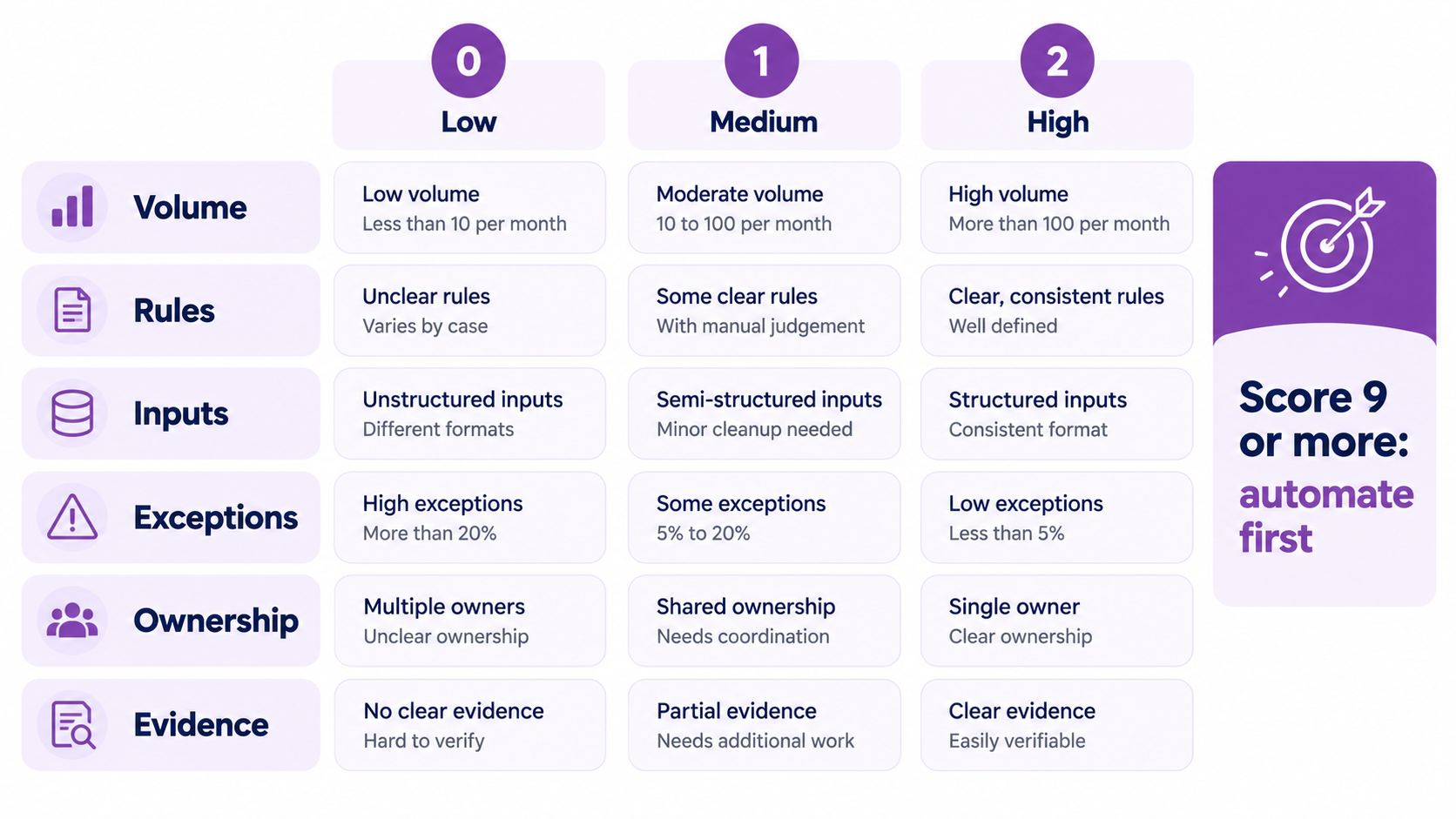
A process is ready when it repeats every period, follows written rules, has consistent inputs, and has a named owner. Score it before you build.
Score each criterion 0, 1, or 2. Automate processes that score 9 or more first.
A low score isn't a failure. It shows what to fix first, and inputs and ownership usually come before software.
For example, bank matching might score 10 or 11. It repeats monthly, the rules are clear, and one preparer owns it.
Revenue recognition adjustments might score 4, because every client needs a judgment call.
Where should you start?
Start with high-volume, rule-based processes that already have clear owners. Bank matching, recurring entries, and document requests usually score highest.
Pick one process, not all five. A narrow pilot gives you a clean baseline and a clear lesson for the next one.
We cover two of these in depth. See bank reconciliation automation and journal entry automation.
How do you automate an accounting process step by step?
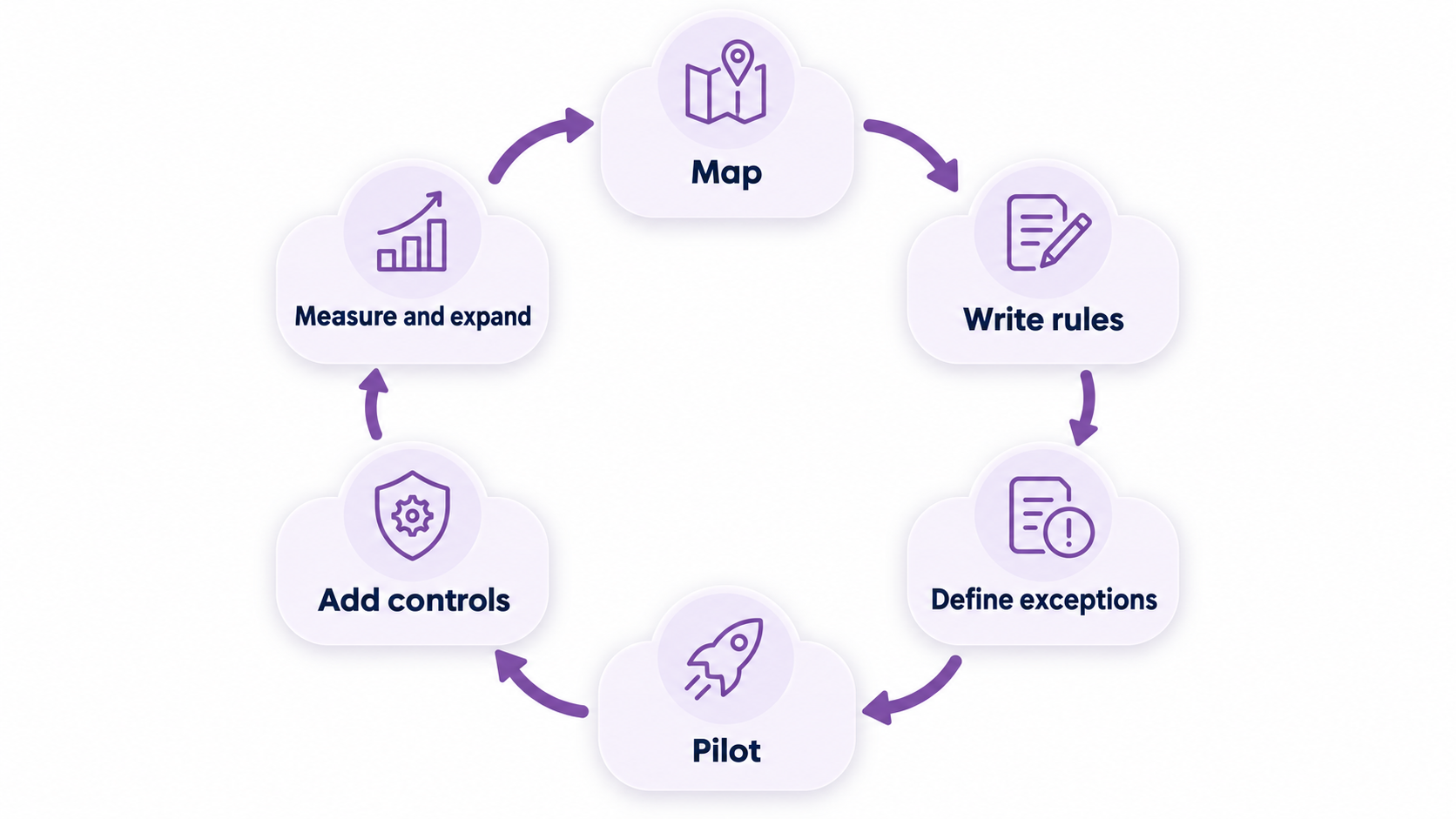
Automate in six steps: map the process, write decision rules, define exceptions, pilot on a few clients, add controls, then measure and expand.
Step 1: Map the current process
Write down each step, who does it, and what it produces. Include the workarounds people use today, because they often hide the real rules.
Step 2: Write the decision rules
Turn judgment into rules where you can. For example, bills from a stable vendor under a set amount use a fixed account.
Step 3: Define exceptions and owners
List what the rules can't handle. Give each exception type an owner and a time limit, since exceptions are part of the design.
Step 4: Pilot on a few clients
Choose clients with clean books and responsive contacts. Run one full cycle and record every issue before expanding.
Step 5: Add controls and sign-off
Set thresholds, approvals, and an audit trail. Decide who reviews the first live cycles and what they check.
Step 6: Measure and expand
Compare results with your baseline. Fix the rules that produce exceptions. Then add the next client group.
What controls keep automated accounting processes safe?
Use thresholds, approvals, an audit trail, role separation, and a change log. These keep automation from hiding errors.
Controls matter more as automation grows. A small error repeated across clients becomes a large one.
Where do accounting automation projects fail?
They fail when firms automate unstable processes, skip ownership, or measure only hours saved. Each failure shows up as extra review work.
- Automating a process with no written rules.
- Buying a tool before choosing the process.
- Leaving exceptions with no owner.
- Changing rules with no record.
- Expanding to every client before the pilot works.
- Tracking activity instead of review time and rework.
A pilot, a scorecard, and a named owner fix most of these.
How does process automation connect to the close?
Close tasks make the best early targets because they repeat every month. As a result, automating them shortens the path from cutoff to sign-off.
Start with reconciliations and recurring entries. Then add checklist routing. See how these fit the 5-day schedule in our month end close guide.
How is process automation different from workflow automation and AI?
Process automation runs the task, workflow automation routes it, and AI-assisted tools suggest answers. Most firms use all three, in that order of maturity.
Whichever type you use, keep a reviewer approving anything that posts to the ledger.
What should you document before you automate?
Document the process so a new preparer could follow it. If a person can't follow it, software can't either.
Keep each process document to one page. Short documents get used and updated.
How long does it take to roll out accounting process automation?
Plan a 90-day pilot for one process. Spend the first month stabilizing, the second building and testing, and the third running live with review.
Treat these as planning ranges, not benchmarks. A simple process may move faster, while a process with many exceptions will take longer.
How should you handle exceptions in an automated process?
Give every exception type an owner, a time limit, and an escalation path. Exceptions aren't failures. They're where people should spend their time.
Log every exception with its reason. The log shows you which rules to fix first and which clients need better inputs.
Checklist before you go live
- Name a process owner.
- Write the rules and test them on past periods.
- Give exceptions owners and time limits.
- Set thresholds and approvals.
- Tell reviewers what to check in the first cycles.
- Record a baseline to compare against.
What challenges should you expect with accounting process automation?
Expect four challenges: staff resistance, integration gaps, messy inputs, and data access. Each one has a practical fix.
Talk to your team before you buy anything. People support what they helped design.
Real example: Accruity, a US real estate financial firm
Accruity is a US real estate financial firm that works with Etisson. It runs QuickBooks Online, Appfolio, and Qualia.
Its case study reports a 60% cut in labor costs, 25% of partner time reclaimed, and 100% audit-ready books.
Etisson runs process work to documented SOPs and review gates, with automation-first workflows, for every client.
Read the full Accruity case study.
How Etisson can help
Many firms already know which processes to automate. What they lack is capacity, and a standard they can run every month.
Etisson runs on EOS, the Etisson Operating System. Our vetted professionals work from documented SOPs, and a QC review checks the work before delivery.
A Customer Success contact owns service levels, and weekly partner calls keep the process on track. A full-time bookkeeper seat starts at $2,200 per month.
See how we support close and finalization for CPA firms. For tool choices, read our guide to accounting software for CPA firms.

Ready to Automate Accounting Processes Without Adding Review Risk?
Etisson's dedicated team runs your processes inside documented SOPs, with QC review before work reaches your partners.
FAQ
What is accounting process automation?
Accounting process automation uses software and rules to run repeatable accounting tasks, such as matching transactions or posting recurring entries, while accountants keep review and judgment.
How to automate an accounting process?
Pick one repeatable process, write its rules and exceptions, pilot it on a few clients, add approvals and an audit trail, then measure and expand.
Which accounting processes should you automate first?
Start with high-volume, rule-based processes: bank matching, recurring journal entries, bill coding, and document requests. They repeat often and have clear rules.
Is CPA going to be replaced by AI?
No. AI handles repeatable tasks, but CPAs still make judgment calls, review exceptions, sign off work, and advise clients. The role shifts toward review and advice.
What are some examples of accounting automation?
Common examples include bank transaction matching, recurring journal entries, bill coding and approvals, client document reminders, and close checklist routing.
How do you decide if a process is ready to automate?
Score it on volume, rules, inputs, exceptions, ownership, and evidence. Processes that repeat monthly, follow written rules, and have a named owner are ready.
What is the difference between process and workflow automation?
A process is the work, such as reconciling an account. A workflow is how that work moves between people and approvals. Automating each solves a different problem.
Does accounting process automation reduce errors?
It reduces manual entry errors when rules are sound. Bad rules repeat mistakes at scale, so controls, sampling, and review remain necessary.
Can a small CPA firm automate accounting processes?
Yes. Start with one process, one owner, and a short SOP. A small pilot teaches more than a large rollout.
Conclusion
Accounting process automation works when you choose processes by readiness, not by tool features.
Score the process, name an owner, write the rules, and pilot on a few clients. Add controls before you scale.
Then measure review time and rework, not just hours saved. Repeat the cycle for the next process with the same scorecard and the same controls.
For the full structure, return to our guide to accounting workflow automation.
.avif)