
.avif)

Blog Summary
- Journal entry automation uses templates and rules to create recurring, reversing, and allocation entries
- Which entries to automate first, and which to keep manual
- Who owns templates and who approves entries
- The controls every automated entry needs: support, approval, change log, and period check
- A four-phase rollout plan and a monthly review checklist
Journal entries are where small mistakes become large ones. A missed depreciation entry or a wrong allocation can carry through a whole quarter.
Automation can remove the repeat work. It only works, however, when each entry has a template, a trigger, support, and an approval rule.
This guide shows which entries to automate, which controls to keep, and how to roll it out in a CPA firm.
What is journal entry automation?
Journal entry automation uses templates and rules to create recurring, reversing, and allocation entries on a schedule, with support attached and approval rules applied.
The goal isn't to remove people. It's to remove retyping, so reviewers can check the logic and the exceptions instead of the keystrokes.
It's one part of a wider process. See our guide to accounting process automation for how to choose what to automate.
Entry types that fit automation
- Recurring entries: the same entry every period, such as depreciation.
- Reversing entries: accruals that reverse at the start of the next period.
- Allocation entries: costs split by a fixed or formula-based rule.
- Amortization entries: prepaid expenses spread over time.
How does journal entry automation work?
Each automated entry has four parts: a template, a trigger, attached support, and an approval rule. Remove one part and the control weakens.
A good template reads like a short SOP. Anyone reviewing it should see what it does and why.
.png)
Why automate journal entries?
Firms automate journal entries to stop missed entries, apply the same coding every period, and give reviewers a consistent package to check.
Late and missing entries often cause post-close adjustments. A scheduled template removes the need for someone to remember.
Automation also helps the month end close process. Because recurring entries post early, the final days focus on exceptions and review.
Which entries should you automate first?
Automate entries that repeat every period, follow a fixed rule, and have a clear support schedule. Keep judgment-heavy entries manual.
Start with depreciation and prepaid amortization. They're stable, and you can verify them against a schedule.
For the controller-level view of these entries, see our guide to accruals, prepaids, and depreciation.
Who should own and approve automated journal entries?
A preparer owns the templates, a reviewer approves entries, and the controller owns the rules and thresholds. Preparers should not approve their own entries.
In an outsourced model, the provider prepares entries under your standard. Your reviewer keeps approval rights.
When should a firm automate journal entries?
Automate when the same entries are rebuilt every month, late entries cause adjustments, or reviewers keep asking for missing support. Wait if schedules are unstable.
Signs you are ready
- Staff key the same entries by hand every period.
- Your team misses entries or posts them late.
- Staff save support in different places.
- Review notes ask for the same schedule each month.
Signs you are not ready
- Fixed asset or prepaid schedules are out of date.
- Allocation rules change from month to month.
- No one owns the chart of accounts.
Fix the schedules first. An automated entry built on a wrong schedule posts the wrong amount every period.
Where does journal entry automation break?
It breaks when schedules go stale, templates change without approval, reversing entries misfire, or support is missing. Each has a simple control.
Most failures are quiet. They appear as small variances that grow across periods.
For example, if a firm buys a new vehicle in March but nobody updates the fixed asset schedule, the April depreciation entry still posts the old amount.
How do you implement journal entry automation?
Implement in four phases: inventory the entries, build and test templates, run with review, then monitor and tune. Start with a few stable entries.
Phase 1: Inventory the entries
List every recurring entry by client. Record the accounts, the amount logic, the support, and the current owner.
Phase 2: Build and test templates
Create one template per entry and test it against the last three periods. Compare the output with what your team posted by hand.
Phase 3: Run with review
Run live for one cycle with full review. Check amounts, accounts, memos, and support. Fix differences before expanding.
Phase 4: Monitor and tune
Track missed entries, adjustments after close, and review notes. Update templates when schedules or policies change.
What controls should every automated entry have?
Every automated entry needs attached support, an approval rule, a change log, and a period check. These four keep automation auditable.
- Support: the schedule or calculation that explains the amount.
- Approval: a named approver and a value threshold.
- Change log: who changed the template, when, and why.
- Period check: the entry posts to the right period and respects the lock.
- Reversal check: reversing entries are tested during the review.
Review checklist for automated entries
- Open the entry list for the period and compare it to the prior month.
- Check that every expected template posted.
- Review entries above the threshold in full.
- Confirm support is attached and current.
- Confirm reversals posted as expected.
- Record the reviewer name and date.
How does journal entry automation fit the close?
Recurring entries should post early in the close. Schedule them right after cutoff, so reviewers see them on day one.
This follows the sequence in our month end close guide. For bank-side work, see bank reconciliation automation.
How do reversing entries and allocations work?
A reversing entry posts at period end and reverses on the first day of the next period. An allocation splits a cost across accounts or entities by a stated rule.
Reversing entries suit accruals. The expense is recorded in the right period, then the reversal clears it when the real bill arrives.
Allocations need a written rule, such as a fixed percentage or a driver like headcount. Approve the rule once, then review it when the driver changes.
What should a journal entry template include?
A template should record the accounts, the amount logic, the trigger, the support, the approver, and the reversal setting. Missing fields cause missing controls.
How do manual, template, and automated entries compare?
Manual entries cost the most time. Templates with review add consistency. Automated entries with thresholds add speed, but they need the strongest controls.
However, move from templates to thresholds only after several clean cycles.
Mistakes to avoid
- Automating entries before schedules are accurate.
- Letting preparers approve their own templates.
- Skipping the reversal check.
- Posting without attached support.
- Never reviewing templates after the first month.
What should you do when a schedule or policy changes?
Update the schedule first, then the template, then test the next entry before it posts. Log the change and its approver.
- Update the support schedule, such as a new asset or a prepaid contract.
- Edit the template and record who requested the change.
- Get controller approval for the changed template.
- Preview the next entry and compare it with the expected amount.
- Record the change in the log, with the date and reason.
Policy changes, such as a new capitalization limit, need the same steps. Treat them as template changes, not as one-off fixes.
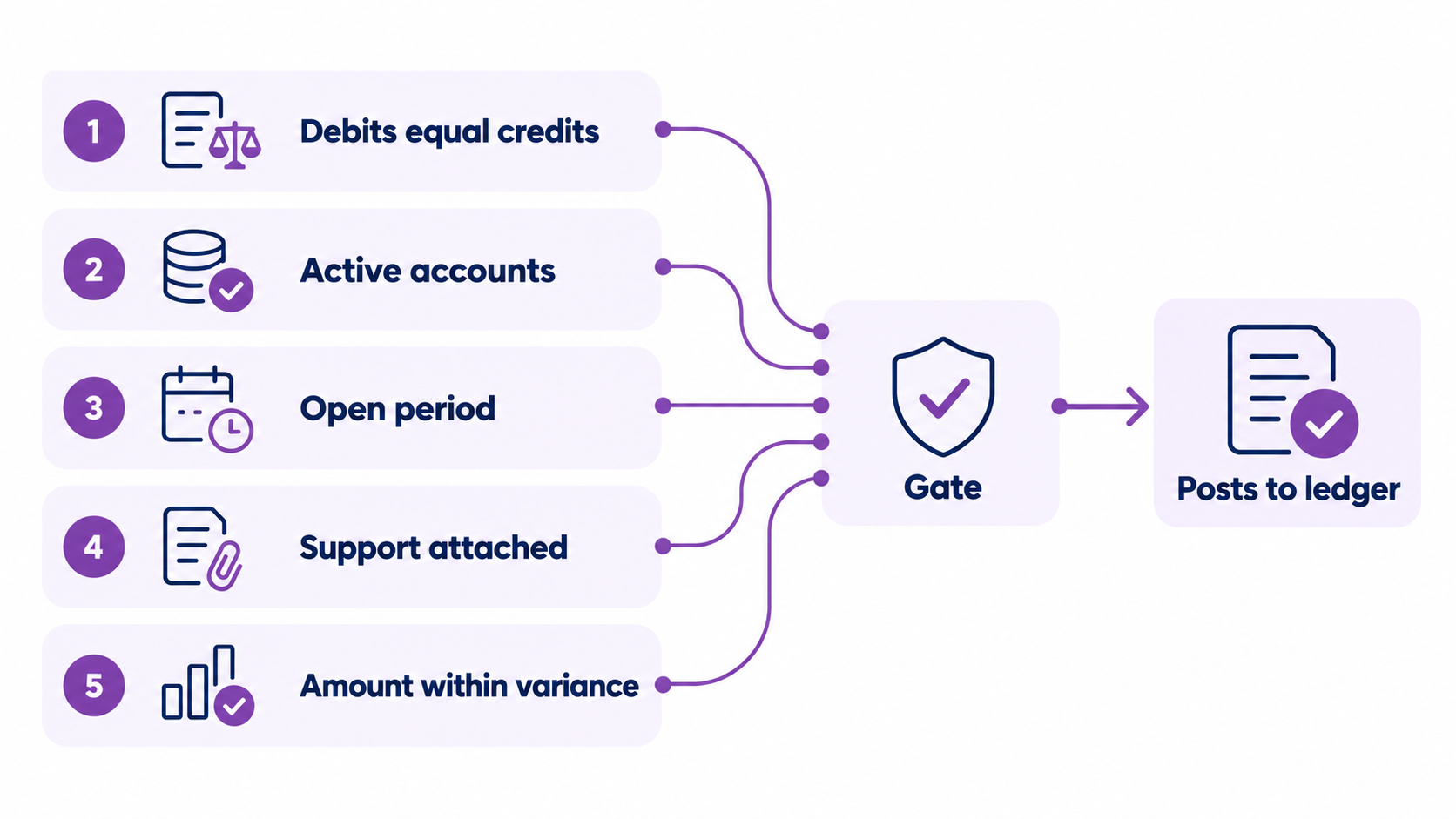
What checks should an automated entry pass before it posts?
Every entry should pass five checks before it posts: balanced debits and credits, active accounts, an open period, attached support, and a reasonable amount.
For intercompany entries, add one more check. The lines on each side should offset, so flag any that don't.
Where does AI fit in journal entry automation?
AI can draft the memo, suggest the account coding, and flag unusual amounts. A person still approves anything that posts to the ledger.
Start with suggestions, not auto-posting. Once the suggestions prove accurate for several cycles, you can let routine entries post under your thresholds.
Real example: Accruity, a US real estate financial firm
Accruity is a US real estate financial firm that works with Etisson. It runs QuickBooks Online, Appfolio, and Qualia.
According to its case study, Accruity cut labor costs by 60%, reclaimed 25% of partner time, and kept its books 100% audit-ready.
Etisson prepares entries for every client under documented SOPs and review gates, using automation-first workflows.
Read the full Accruity case study.
How Etisson can help
Firms usually know which entries to automate. They struggle to find the capacity to maintain schedules and review every period.
Etisson runs on EOS, the Etisson Operating System. Our vetted professionals work from documented SOPs, and a QC review checks entries before delivery.
A Customer Success contact owns service levels, and weekly partner calls keep exceptions moving. A full-time bookkeeper seat starts at $2,200 per month.
See how we support close and finalization and our outsourced controller services.

Want Recurring Entries Handled Without Adding Headcount?
Etisson's dedicated team prepares entries inside documented SOPs, with QC review before work reaches your reviewer.
FAQ
What is journal entry automation?
Journal entry automation uses templates and rules to create recurring, reversing, and allocation entries on a schedule, with support attached and approvals applied.
Can AI do journal entries?
Yes, as drafts. AI can suggest accounts, write memos, and flag unusual amounts. A person should approve anything that posts to the ledger.
How can I automate my accounting?
Start with one repeatable process, such as bank matching or recurring entries. Document the rules, add approvals, test on past periods, then expand step by step.
Can AI be used to automate data entry?
Yes. AI can read invoices and statements and fill in fields for you. Review the results, because wrong extracted amounts become wrong entries.
Which journal entries can be automated?
Recurring entries such as depreciation, prepaid amortization, payroll accruals, and standard allocations. Keep revenue recognition and one-time adjustments manual.
How do you control automated journal entries?
Attach support to each entry, set approval thresholds, log template changes, check the period, and test reversals during review. Preparers should not approve their own entries.
Are automated journal entries audit-ready?
They can be, when support is attached, approvals are recorded, and changes are logged. Without those, automation makes the audit trail weaker, not stronger.
How often should automated entries be reviewed?
Review the entry list every period and review templates whenever schedules or policies change. Large entries should always get a full review.
Does journal entry automation replace the accountant?
No. It removes retyping. Accountants still design the rules, review exceptions, handle judgment entries, and approve the results.
Conclusion
Journal entry automation works when each entry has a template, a trigger, support, and an approval rule.
Start with depreciation and prepaid amortization, keep judgment entries manual, and log every template change.
That gives reviewers a consistent package and keeps the audit trail clean.
For the full structure, return to our guide to accounting workflow automation.